 MyCelium Wiki
Advancements
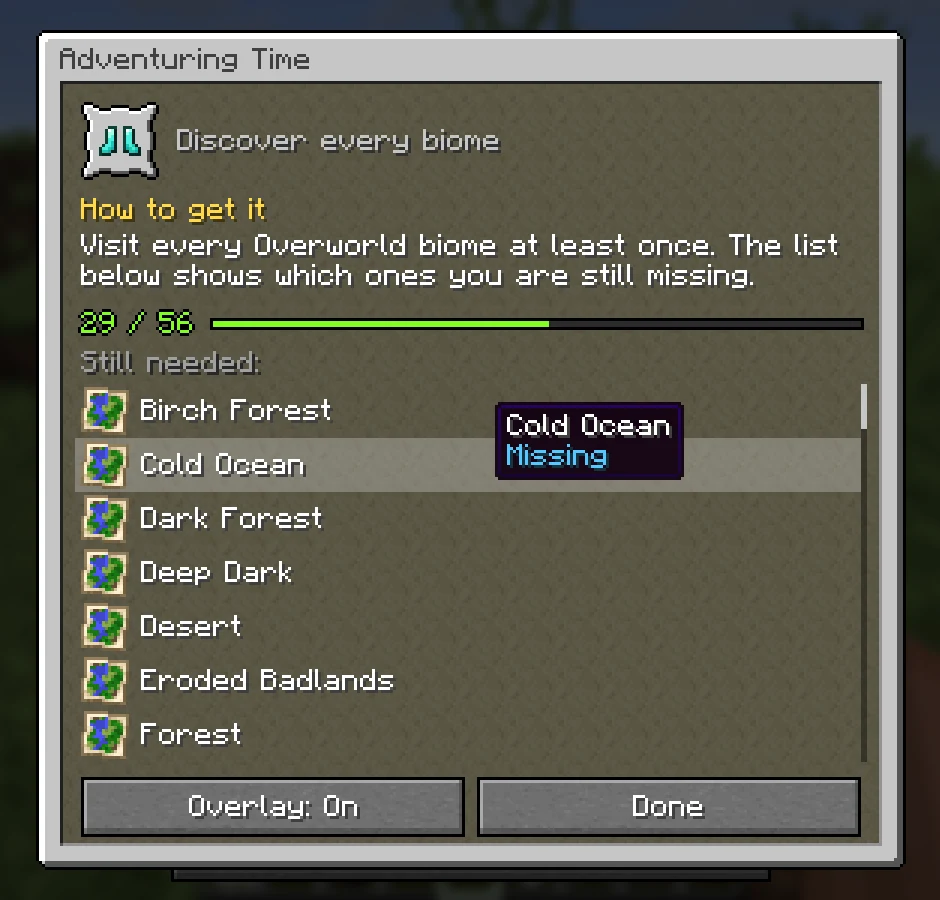
Vanilla tells you "Discover every biome", but not which ones you are missing. Advancements does. Click any advancement in the advancements screen and a small window explains how to get it, shows how far along you are, and lists exactly what is still needed: every biome, food, mob, cat or wolf variant. Turn on its overlay and you can follow it while you play, right above your hotbar.
The short version
- Press L (the advancements key) and click any advancement to open its window.
- The window explains how to get it, written for every one of Minecraft's 126 advancements.
- For advancements with many parts, it lists what is still missing: biomes, foods, mobs, animals, cat and wolf variants, armor trims.
- Overlay: On shows the advancement above your hotbar with its progress, and celebrates every new part with a little animation and sound.
- Client only: works in singleplayer and on any server, vanilla servers included.
Quick links
- Installing (remember the Mycel jar too)
- Commands (live config reload)
- Changelog
- Source code