 MyCelium Wiki
Brewing+
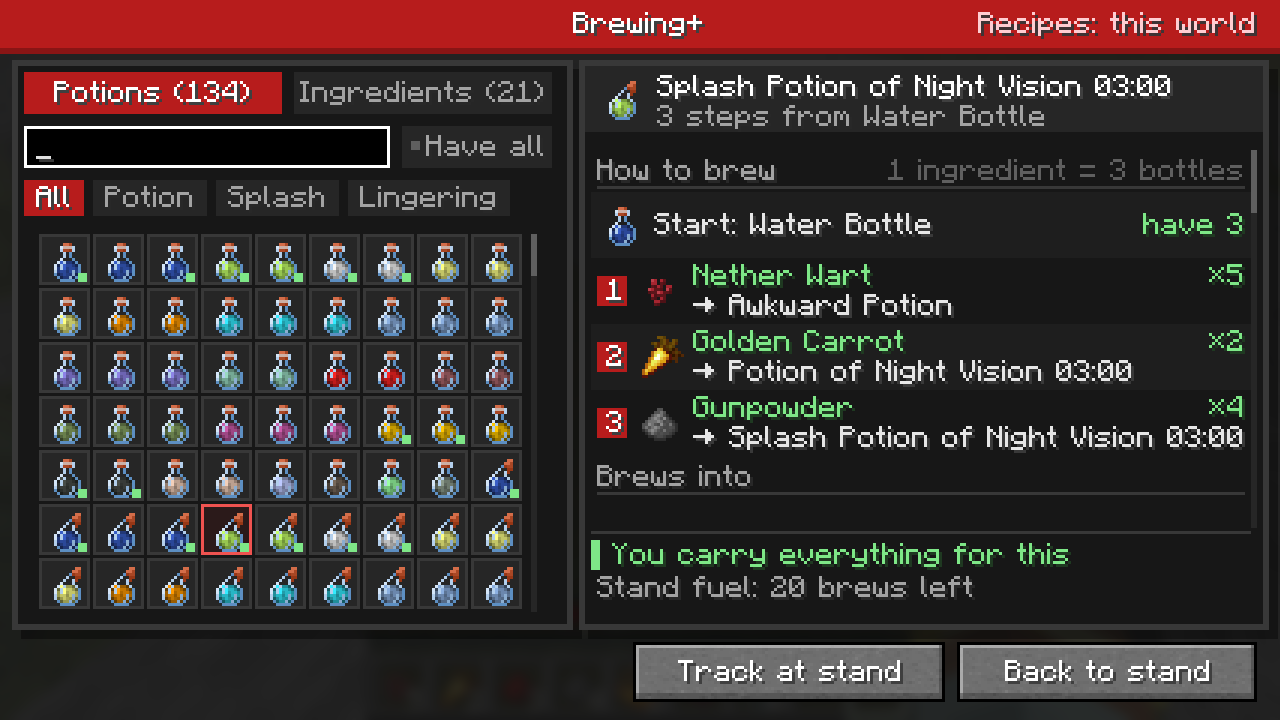
Never look up a potion recipe again. Click the small potion button on any brewing stand and pick a potion: Brewing+ shows its full recipe from a water bottle, the ingredient for every step, and how many of each you carry. Track it, go back to the stand, and the stand itself shows the next ingredient to add. Covers every potion, splash and lingering form the world can brew. Client side, no keybinds.
How it works
The stand button, the potion and ingredient pages, filters, and the stand hint.
The short version
- Open a brewing stand and click the potion button in its top-right corner. The stand stays open; Back to stand returns to it with your bottles in place.
- Potions: pick any potion to see every step from a water bottle, what it brews into next, and other ways to make it. A green dot marks potions you can brew right now.
- Ingredients: pick any ingredient to see every recipe it is used in.
- Track at stand puts a faded ghost of the next ingredient in the stand's ingredient slot, plus a small card with the next step.
- In singleplayer the guide reads your world's actual recipes, datapacks included.
- Client-side only: each player who wants it installs it locally. Servers need nothing.
Quick links
- Installing (remember the Mycel jar too)
- Commands (live config reload)
- Changelog