 MyCelium Wiki
Anvil Cost Calculator
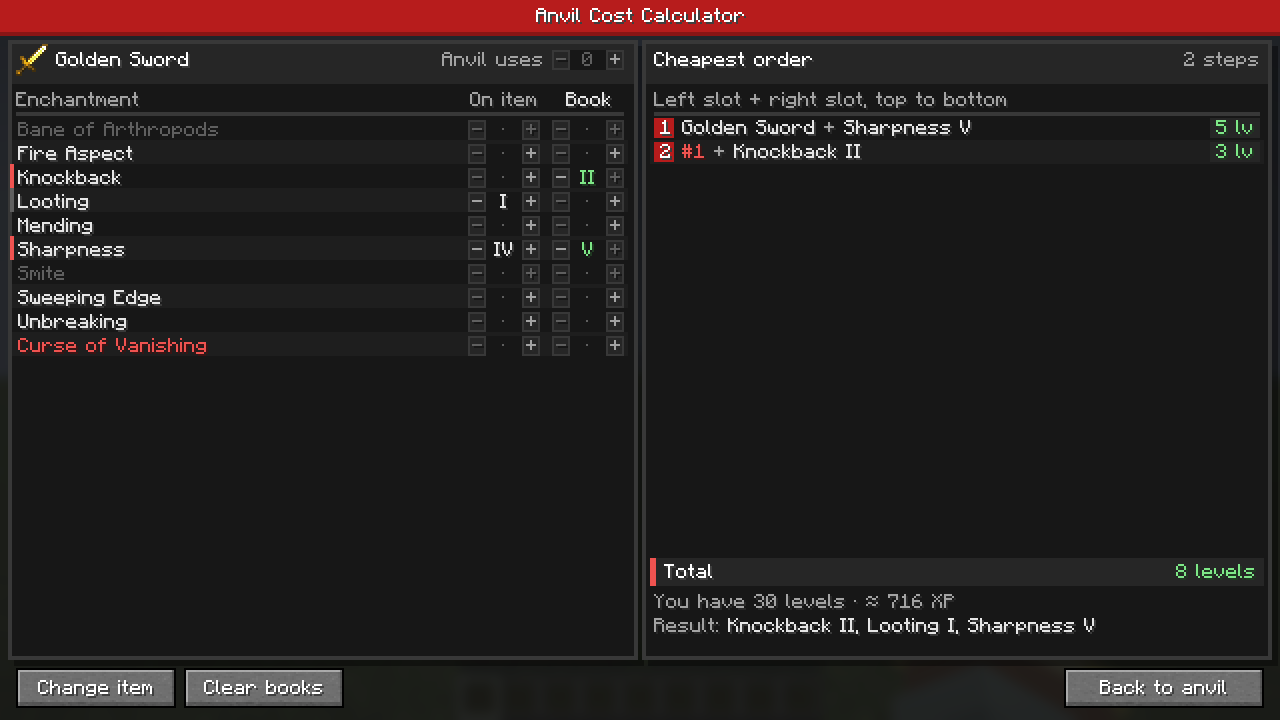
Know the XP before you pay. Click the small XP button on any anvil, pick the item you want to enchant, say what it already has and which books you want to add, and the planner shows the cheapest order to combine them, with the level cost of every step. Works for every enchantable item, from swords and armor to flint and steel, or for combining enchanted books on their own. Client side, no keybinds.
The short version
- Open an anvil and click XP in its top-right corner. The anvil stays open; Back to anvil returns to it with your items still in the slots.
- Pick any enchantable item, or Enchanted Book to combine books only. If an item sits in the anvil's left slot, the planner starts from it.
- Set each enchantment's level under On item (what it has) and Book (what you add), plus the item's earlier anvil uses.
- The right side shows the cheapest order, step by step, using vanilla's exact anvil math, and avoids any step of 40 levels or more ("Too Expensive!") whenever possible.
- Item tooltips show how often an item has been through an anvil and the extra cost that adds.
- Client-side only: each player who wants it installs it locally. Servers need nothing.
Quick links
- Installing (remember the Mycel jar too)
- Commands (live config reload)
- Changelog