 MyCelium Wiki
Better Server List
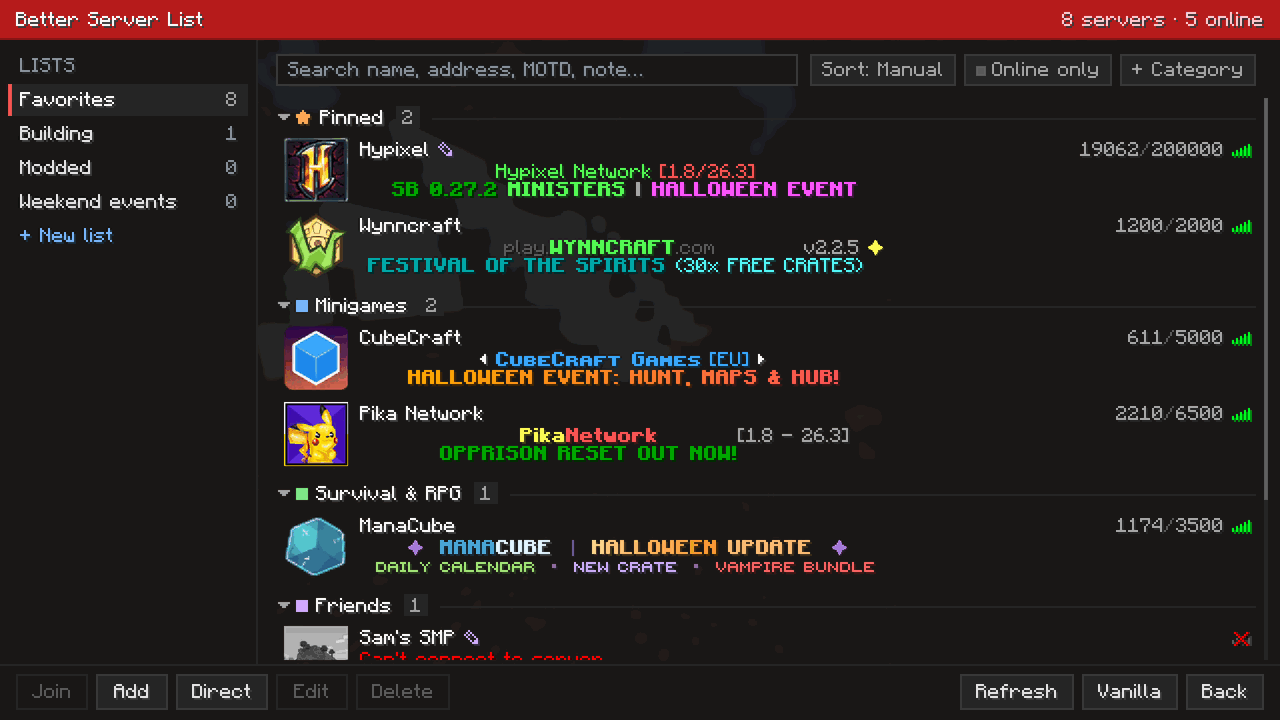
The multiplayer screen, organized. Keep your servers in several lists, group them into collapsible categories, pin favorites to the top, and find any server by just typing. Drag and drop to sort, right-click for everything else. Your existing servers are imported the first time you open it, and the vanilla server list stays in sync, so removing the mod loses nothing. Client side.
The short version
- Click Multiplayer as usual: Better Server List opens instead of the vanilla list, with your servers already in it.
- Lists on the left: as many as you like. Categories inside each list fold away with a click. Pinned servers sit at the top.
- Just type to search names, addresses, MOTDs, notes and categories. Sort by your own order, name, players, ping or last played.
- Drag a server to reorder it, onto a category, or onto another list (hold Ctrl to copy). Right-click anything for its menu.
- Add a note to any server; hover its name to see the note and when you last played.
- The Vanilla button opens the original screen whenever you need it.
- Client-side only: each player who wants it installs it locally. Servers need nothing.
Quick links
- Installing (remember the Mycel jar too)
- Commands (live config reload)
- Changelog
- Source code