 MyCelium Wiki
AutoBlockRefiller features
The core loop
When you right-click to place a block, the mod notes which hand you used and what you were holding. Two ticks later, once the game has finished resolving the placement, it looks at that slot: if placing the block emptied it, and more of the same block sit in your inventory, a full stack slides into the empty slot. The short delay is on purpose. Loader hooks fire before the block is placed, so checking immediately would see a slot that is not empty yet.
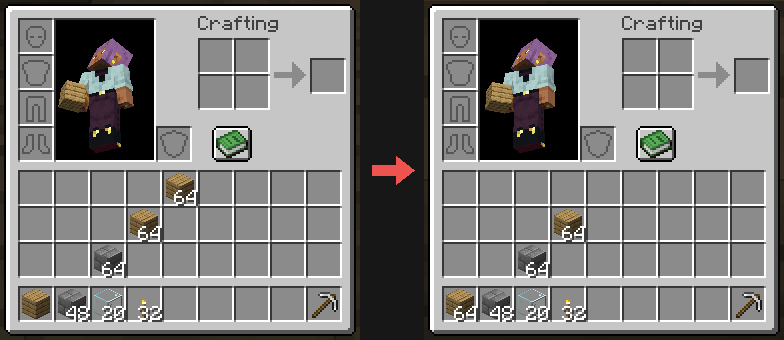
Blocks and used-up items
- Blocks refill by block: a renamed stack of stone still refills stone.
- Items you use up by right-clicking refill too: snowballs, eggs, ender pearls, wind charges, firework rockets, bone meal, splash potions. These must match exactly, so a splash potion of healing is never swapped for one of poison, and rockets keep their flight time. Turn this off with
refillItems. - Wearables are left alone. Right-clicking a chestplate puts it on and empties your hand; the mod does not hand you a second one.
- Food is not refilled, because eating takes longer than the two-tick check.
- Empty means empty. If anything is in the slot two ticks later (the placement failed, you switched items, you picked something up), the slot is respected and nothing happens. The mod never overwrites your stuff.
Where refills come from
- Main inventory first. Slots 9-35 are always searched, in order.
- Other hotbar slots only if you opt in with
searchHotbar(off by default). Your other hotbar stacks are left alone otherwise. - Never from armour, the offhand, or crafting slots. Worn and held gear is never touched as a source.
Both hands covered
Placing from the selected hotbar slot refills that slot; placing from the offhand refills the offhand. Each hand is handled independently.
Running low
When the last matching stack goes into your hand, a note above the hotbar says Last stack of Oak Planks. When the slot runs empty and nothing is left, it says Out of Oak Planks. Each refill also plays a quiet pickup sound that only you hear. Both can be turned off: runningLowWarning and refillSound.
Winter update
On by default, and off with /autoblockrefiller set winter false.
- Snowflakes: each refill gives a small puff of snowflakes in front of you, where the new stack lands.
- Sleigh bells: the refill sound becomes a bell chime that climbs a note with every refill.
- Snowball fights never stop: snowballs always refill, even when
refillItemsis off.
The /autoblockrefiller command
Also available as /abr.
| Command | Who | What it does |
|---|---|---|
/autoblockrefiller | Everyone | Shows every setting and its value. Operators can click a value to flip it; hover a setting to see what it does. |
/autoblockrefiller toggle | Everyone | Turns refilling off or on just for you. Remembered across restarts. Servers can switch this off with playerToggle. |
/autoblockrefiller set <setting> <value> | Operators | Changes a setting right away and saves it. Tab completes setting names and values. |
/autoblockrefiller reset <setting>|all | Operators | Puts one setting, or all of them, back to the default. |
Installed without Mycel?
The game still starts. AutoBlockRefiller stays off, writes one warning to the log, and tells every player who joins in chat that Mycel is missing, with a link to download it. Install Mycel for the same Minecraft version and loader and it works.
Performance
The mod does nothing until you right-click with a block or item, then one small inventory scan two ticks later. There are no per-tick loops and nothing runs on the client.