 MyCelium Wiki
Dark Mode configuration
The settings screen
Open Options and click Dark Mode in the top left. On Forge and NeoForge it's also in the mod list. Color changes apply when you close the screen, with a short resource reload.
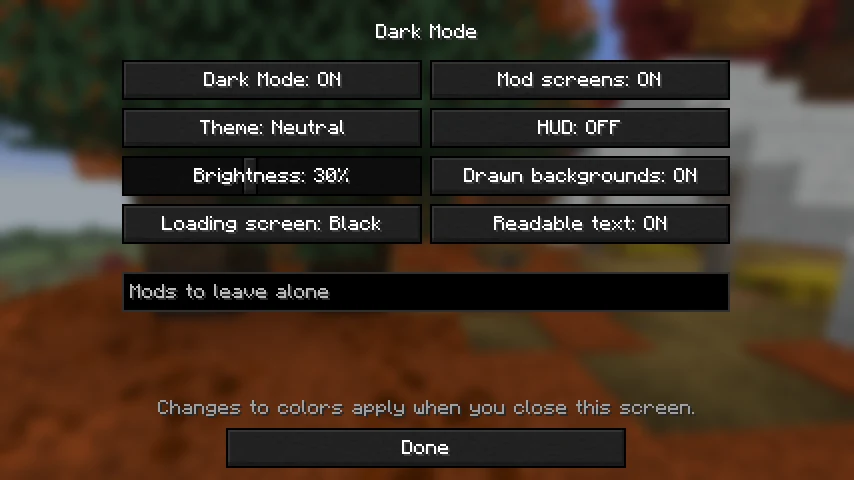
The file
Settings live in config/darkmode.json, created on first start.
{
  "mycel_config_version": 1,
  "enabled": true,
  "theme": "NEUTRAL",
  "brightness": 30,
  "loadingScreen": "BLACK",
  "modScreens": true,
  "hud": false,
  "drawnBackgrounds": true,
  "readableText": true,
  "skippedMods": []
}
Settings
| Key | Default | What it does |
|---|---|---|
enabled | true | Turns dark screens on or off. |
theme | NEUTRAL | The tint: NEUTRAL, MIDNIGHT, FOREST, PLUM or EMBER. |
brightness | 30 | How bright dark screens are, from 8 to 60 percent of normal. |
loadingScreen | BLACK | Mojang screen color: BLACK, CHARCOAL, MIDNIGHT, PLUM or RED (normal). |
modScreens | true | Also darken screens from other mods. |
hud | false | Also darken the hotbar and other parts of the HUD. |
drawnBackgrounds | true | Darken light backgrounds that screens draw in code. |
readableText | true | Brighten dark text so it stays readable. |
skippedMods | [] | Mod ids whose screens stay as they are, such as create. |